 Мануалза!
www.lg.com
OWNER’S MANUAL
LED LCD TV / LCD TV
Please read this manual carefully before operating
your set and retain it for future reference.
LS35**
LS34**
CS46**
P/NO : MFL67409508(1212-REV08)
Printed in Korea
105 страниц подробных инструкций и пользовательских руководств по эксплуатации на русском на английском
Led lcd tv / lcd tv, Owner’s manual Чат поддержки
www.lg.com
OWNER’S MANUAL
LED LCD TV / LCD TV
Please read this manual carefully before operating
your set and retain it for future reference.
LS35**
LS34**
CS46**
P/NO : MFL67409508(1212-REV08)
Printed in Korea
Страница 2 Чат поддержки
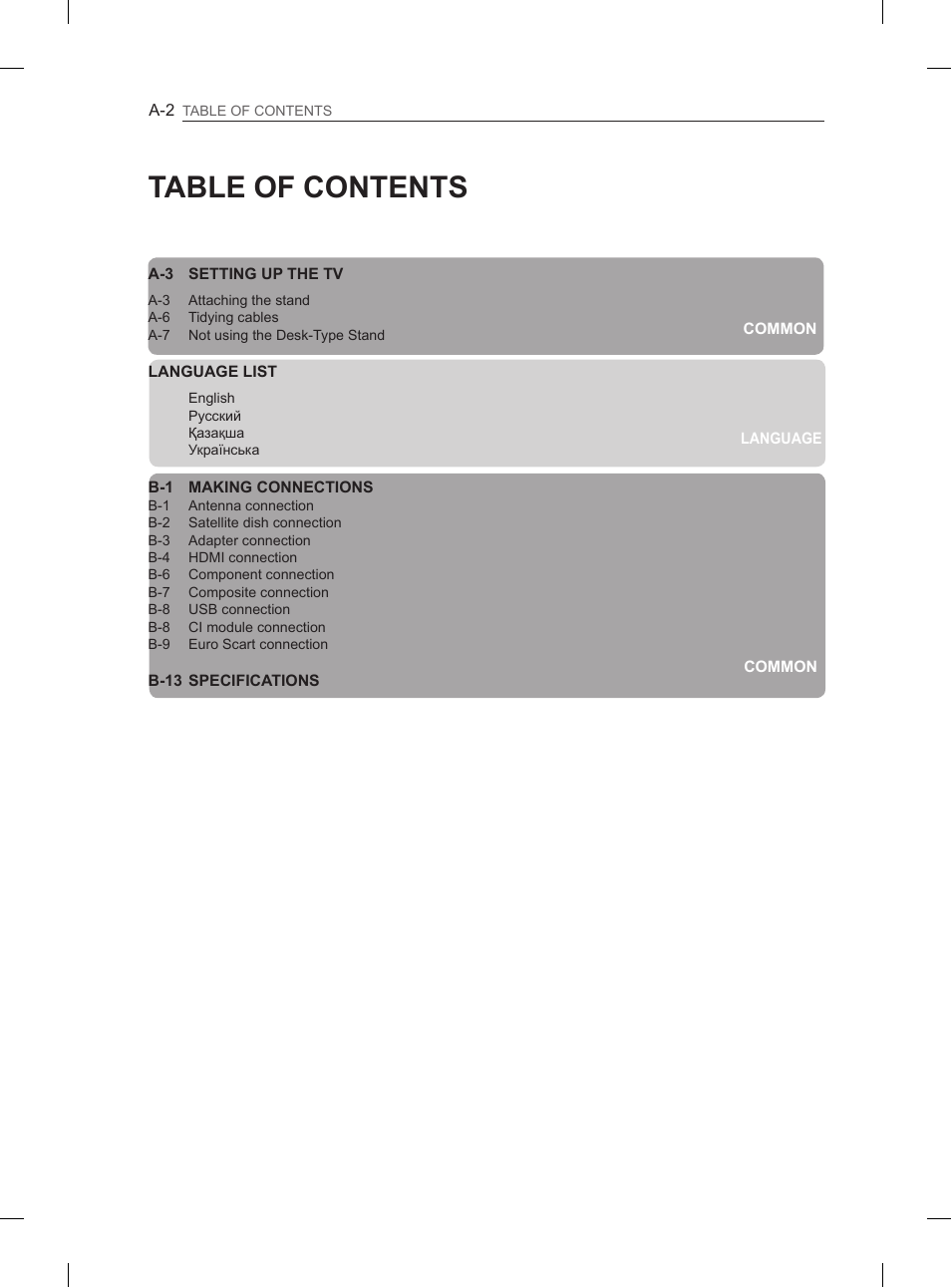
A-2
TABLE OF CONTENTS
LANGUAGE
COMMON
COMMON
TABLE OF CONTENTS
A-3 SETTING UP THE TV
A-3 Attaching the stand
A-6 Tidying cables
A-7 Not using the Desk-Type Stand
LANGUAGE LIST
English
Русский
Қазақша
Українська
B-1 MAKING CONNECTIONS
B-1 Antenna connection
B-2 Satellite dish connection
B-3 Adapter connection
B-4 HDMI connection
B-6 Component connection
B-7 Composite connection
B-8 USB connection
B-8 CI module connection
B-9 Euro Scart connection
B-13 SPECIFICATIONS
Страница 3 Чат поддержки
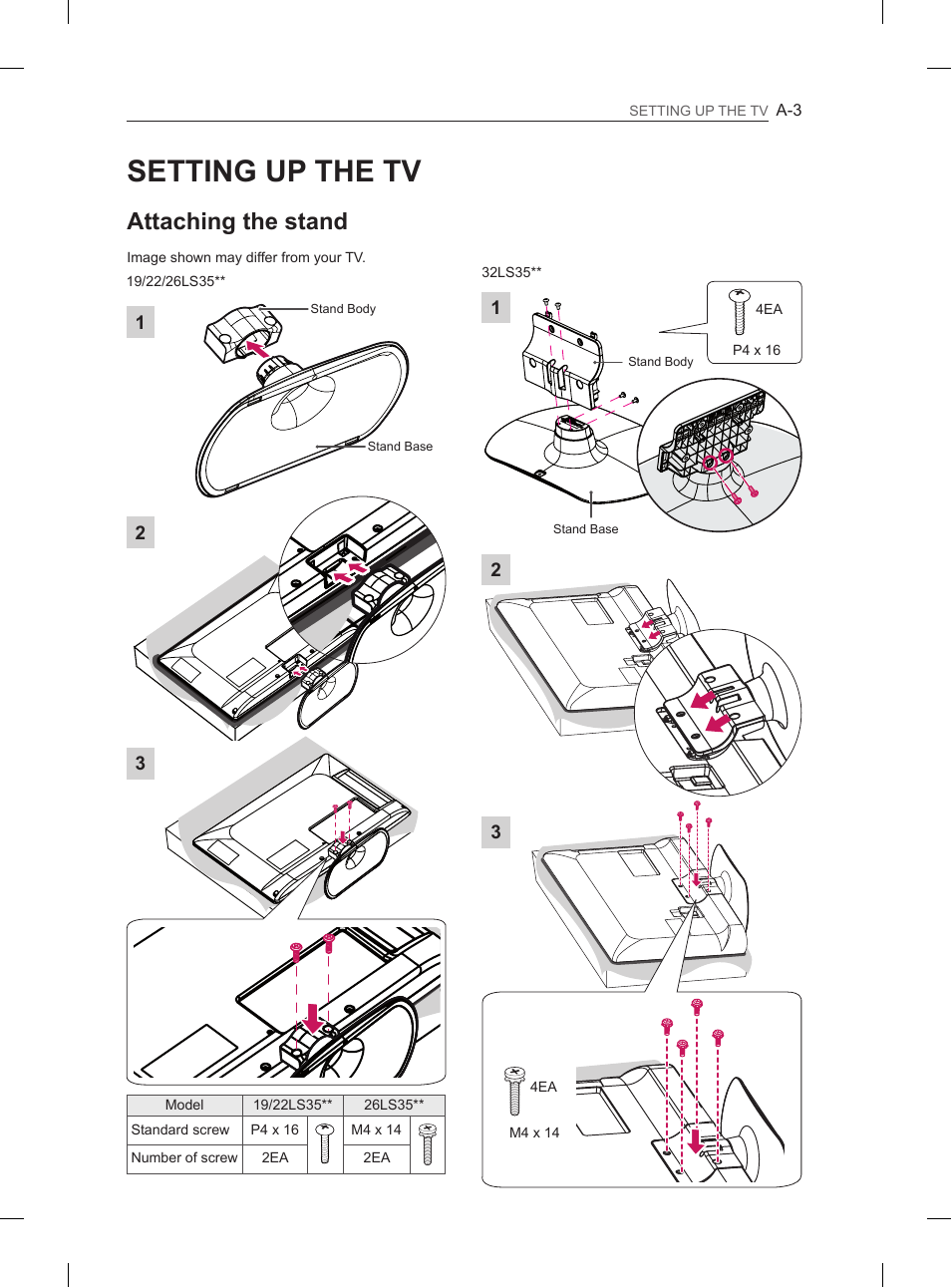
A-3
SETTING UP THE TV
1
3
19/22/26LS35**
Model
19/22LS35**
26LS35**
Standard screw
P4 x 16
M4 x 14
Number of screw
2EA
2EA
2
1
32LS35**
2
Screw(Stand+Head)
M4 x 14
3
Screw(Stand+Head)
M4 x 14
M4 x 14
4EA
Stand Body
Stand Base
Stand Body
Stand Base
Screw(Stand+Head)
M4 x 14
Screw(Stand+Head)
M4 x 14
P4 x 16
4EA
SETTING UP THE TV
Attaching the stand
Image shown may differ from your TV.
Страница 4 Чат поддержки
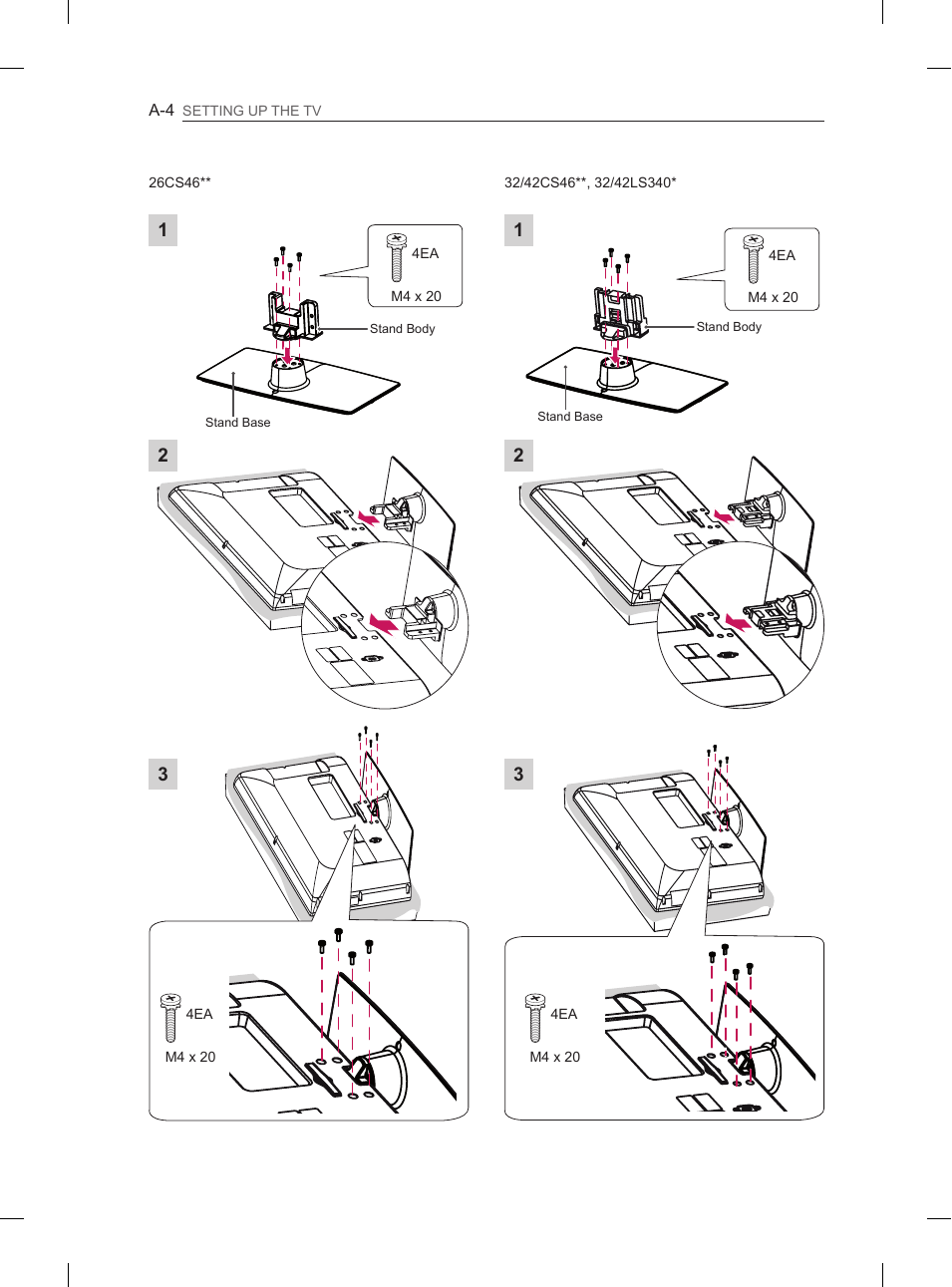
A-4
SETTING UP THE TV
26CS46**
32/42CS46**, 32/42LS340*
Stand Body
Stand Base
M4 x 20
4EA
M4 x 20
4EA
Stand Body
Stand Base
1
3
2
M4 x 20
4EA
1
3
2
M4 x 20
4EA
Страница 5 Чат поддержки
A-5
SETTING UP THE TV
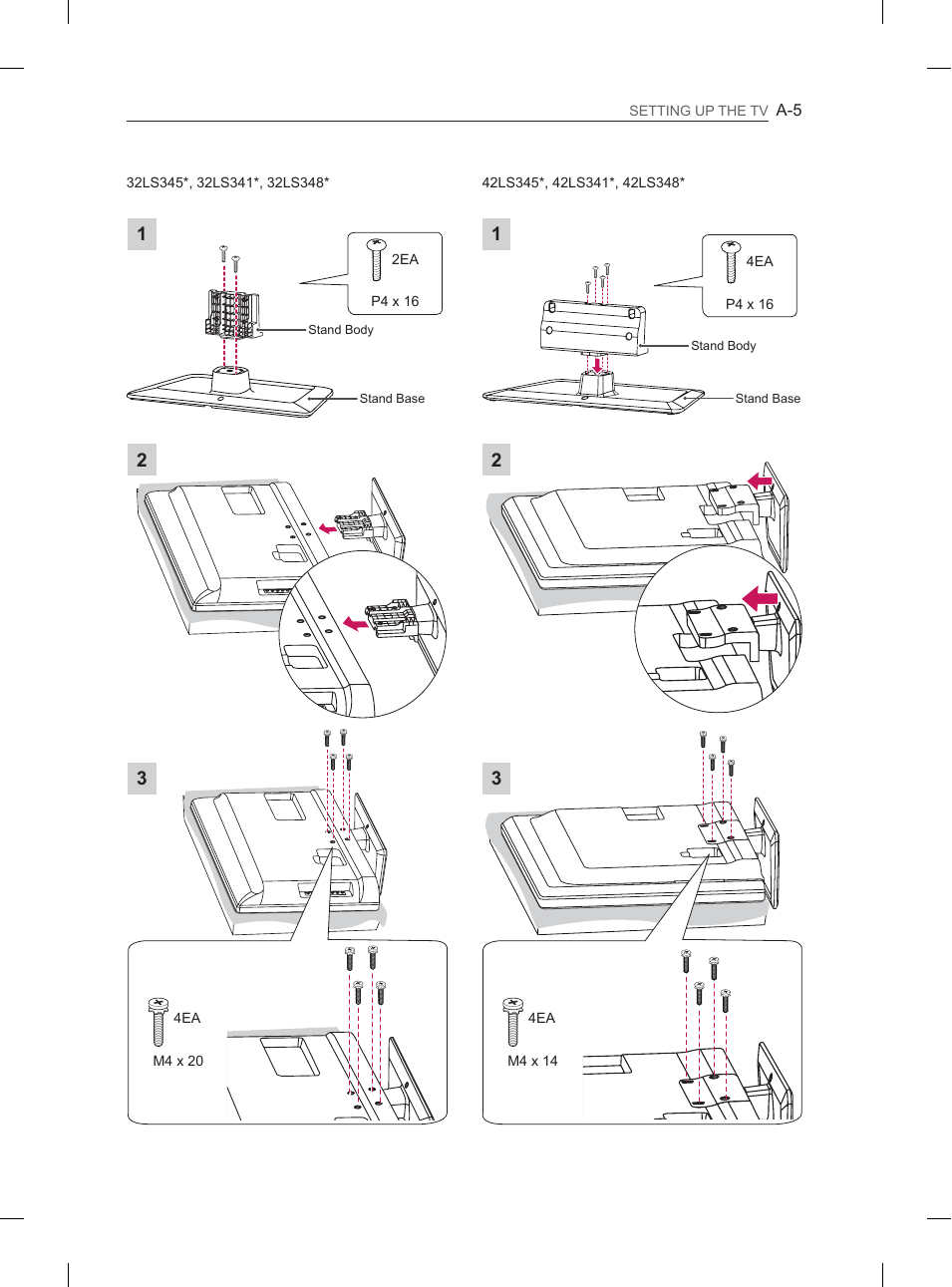
P4 x 16
2EA
1
3
2
M4 x 20
4EA
P4 x 16
4EA
1
3
2
M4 x 14
4EA
32LS345*, 32LS341*, 32LS348*
42LS345*, 42LS341*, 42LS348*
Stand Body
Stand Base
Stand Body
Stand Base
Страница 6 Чат поддержки
A-6
SETTING UP THE TV
Tidying cables
Gather and bind the cables with the cable holder.
(Only 19LS35**)
Cable Holder
(Only 22/26LS35**)
Cable Holder
(Only 32LS35**, 32/42LS345*, 32/42LS341*,
32/42LS348*)
Cable Holder
CAUTION
y
Do not move the TV by holding the cable
holder, as the cable holders may break, and
injuries and damage to the TV may occur.
CAUTION
y
When attaching the stand to the TV
set, place the screen facing down on a
cushioned table or flat surface to protect the
screen from scratches.
y
Make sure that the screws are inserted
correctly and fastened securely. (If they are
not fastened securely enough, the TV may
tilt forward after being installed.)
Do not use too much force and over tighten
the screws; otherwise screw may be
damaged and not tighten correctly.
NOTE
y
Remove the stand before installing the TV
on a wall mount by performing the stand
attachment in reverse.

Страница 7 Чат поддержки
A-7
SETTING UP THE TV
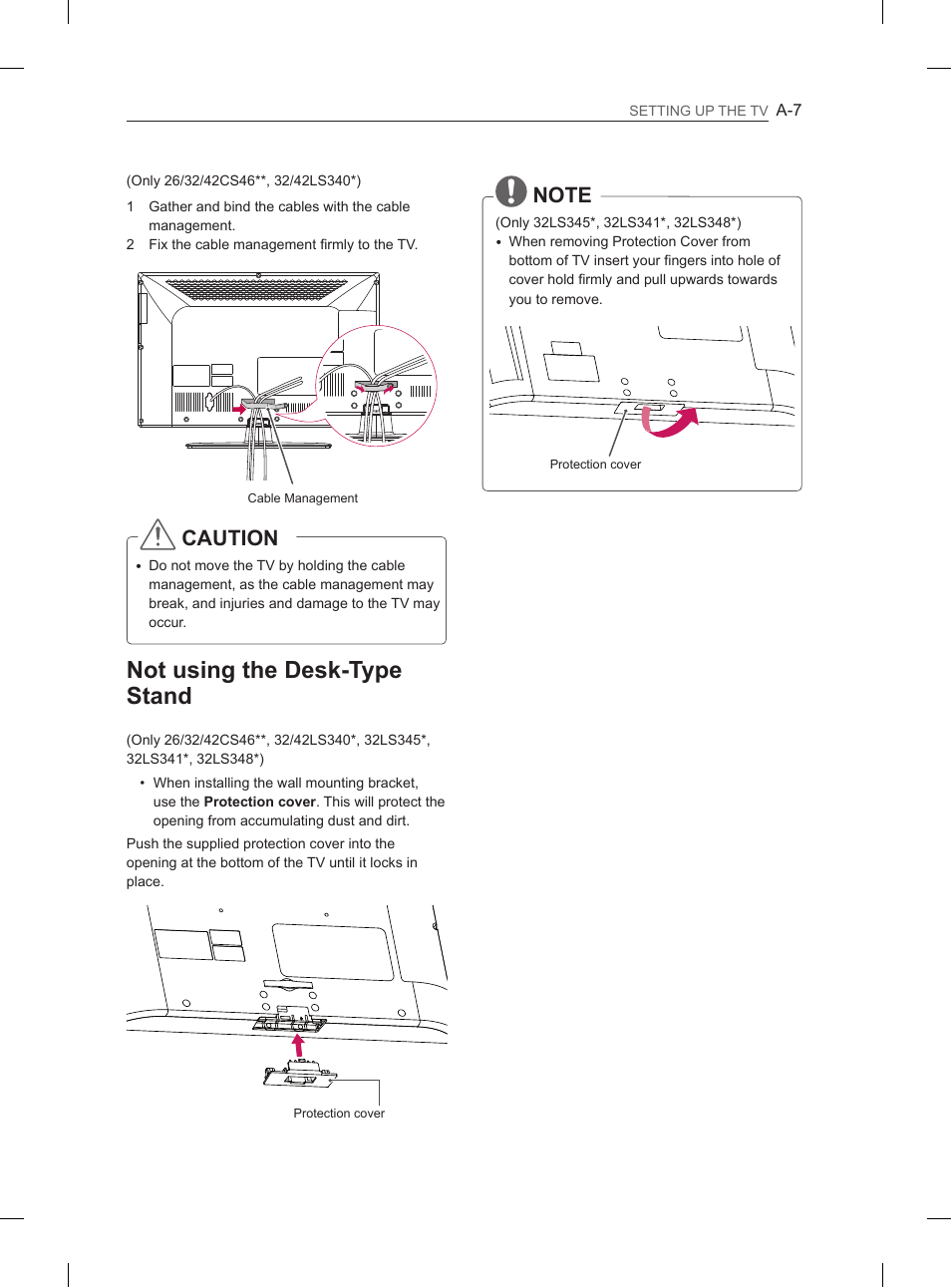
(Only 26/32/42CS46**, 32/42LS340*)
1 Gather and bind the cables with the cable
management.
2 Fix the cable management firmly to the TV.
Cable Management
CAUTION
y
Do not move the TV by holding the cable
management, as the cable management may
break, and injuries and damage to the TV may
occur.
Not using the Desk-Type
Stand
(Only 26/32/42CS46**, 32/42LS340*, 32LS345*,
32LS341*, 32LS348*)
• When installing the wall mounting bracket,
use the
Protection cover. This will protect the
opening from accumulating dust and dirt.
Push the supplied protection cover into the
opening at the bottom of the TV until it locks in
place.
Protection cover
NOTE
(Only 32LS345*, 32LS341*, 32LS348*)
y
When removing Protection Cover from
bottom of TV insert your fingers into hole of
cover hold firmly and pull upwards towards
you to remove.
Protection cover
Страница 9 Чат поддержки
Please read this manual carefully before operating
your set and retain it for future reference.
www.lg.com
OWNER’S MANUAL
LED LCD TV / LCD TV
Страница 10 Чат поддержки
2
ENG
ENGLISH
TABLE OF CONTENTS
WARNING
y
If you ignore the warning message, you
may be seriously injured or there is a
possibility of accident or death.
CAUTION
y
If you ignore the caution message, you may
be slightly injured or the product may be
damaged.
NOTE
y
The note helps you understand and use
the product safely. Please read the note
carefully before using the product.
TABLE OF CONTENTS
3
LICENSES
3
OPEN SOURCE SOFTWARE NOTICE
4
SAFETY INSTRUCTIONS
10 INSTALLATION PROCEDURE
10 ASSEMBLING AND PREPARING
10
Unpacking
15
Parts and buttons
16
Lifting and moving the TV
17
Mounting on a table
19
Mounting on a wall
20 REMOTE CONTROL
21 ENTERTAINMENT
21
Wired Network Connection
21
Network setting
22 USING THE USER GUIDE
23 MAINTENANCE
23
Cleaning your TV
23
- Screen, frame, cabinet and stand
23
- Power cord
23 TROUBLESHOOTING
Не включается телевизор LG. Ремонт Своими Руками
LG CS460 | Full HD LCD TV | Harvey Norman Ireland
Не включается Телевизор LG 42CS460-ZA проблема в блоке питания
LG42PJ363 щёлкает реле, не включается
إصلاح تلفاز LG 42CS460
Look at a 42 Inch LG 42CS460 HD LCD TV I got but the picture far better on the other Hitachi TV P2
LG 42CS460 và các nguồn trên mên khiển
TV LG 42CS460 Ligando ou Desligando Sozinha - RESOLVIDO! Economize a grana do técnico!


Плохо, когда инструкция по ремонту ноутбука хранится в самом ноутбуке.


1 комментарийНе стесняйтесь поделиться с нами вашим ценным мнением.
Снятие блокировки кнопок без пульта